
HEIC to JPG Converter Free for 1 Year (Full License) -GIVEAWAY
If you have ever transferred photos from your iPhone to a Windows PC, you have likely encountered the annoying “HEIC” format. These files take up less space, but they often refuse to open on older Windows versions or basic photo viewers. Suddenly, you find yourself searching frantically for a way to convert heic to jpg without losing quality.
Today, we have excellent news for you. For a limited time, we are giving away a 1-year full license for MobiKin HEIC to JPG Converter 3.10.18 completely for free! You don’t need to pay a cent to access this professional tool. Keep reading to grab your license code and learn how to change heic to jpg effortlessly.
Why Do You Need to Convert HEIC to JPG?
Apple introduced the HEIC (High-Efficiency Image Container) format to save storage space on iPhones. While efficient, this format is not natively supported by Windows 7, Windows 8, or even some older versions of Windows 10.
If you try to open these images without the right codecs, you will see an error message or a blank icon. This is why knowing how to convert heic to jpg is essential for every iPhone user. JPG (or JPEG) is the universal standard—it opens on everything, from your grandmother’s old laptop to your smart TV.
MobiKin HEIC to JPG Converter 3.10.18: A Quick Review
MobiKin HEIC to JPG Converter is a lightweight, standalone software designed specifically for Windows users. It solves the compatibility issue instantly. Here is why we recommend it:
- Batch Conversion: You can add hundreds of HEIC photos and convert them all at once. No need to process them one by one.
- High Quality: It preserves the original image quality (including EXIF data) during the conversion process. Your photos will look exactly as they did on your iPhone.
- User-Friendly: The interface is clean and simple. You don’t need to be a tech expert to use it.
- Fast Speed: The conversion engine is powerful, processing large batches in seconds.
How to Get MobiKin HEIC to JPG Converter for Free (1-Year License)
Usually, this software costs money, but thanks to this exclusive giveaway, you can get it for free. Follow these steps immediately before the offer expires:
Step 1: Download the software using my link below.
[👉HEIC to JPG free Download – ASKCHADI إسأل شادي]
Step 2: Install the program on your computer. The installation process is standard and fast.
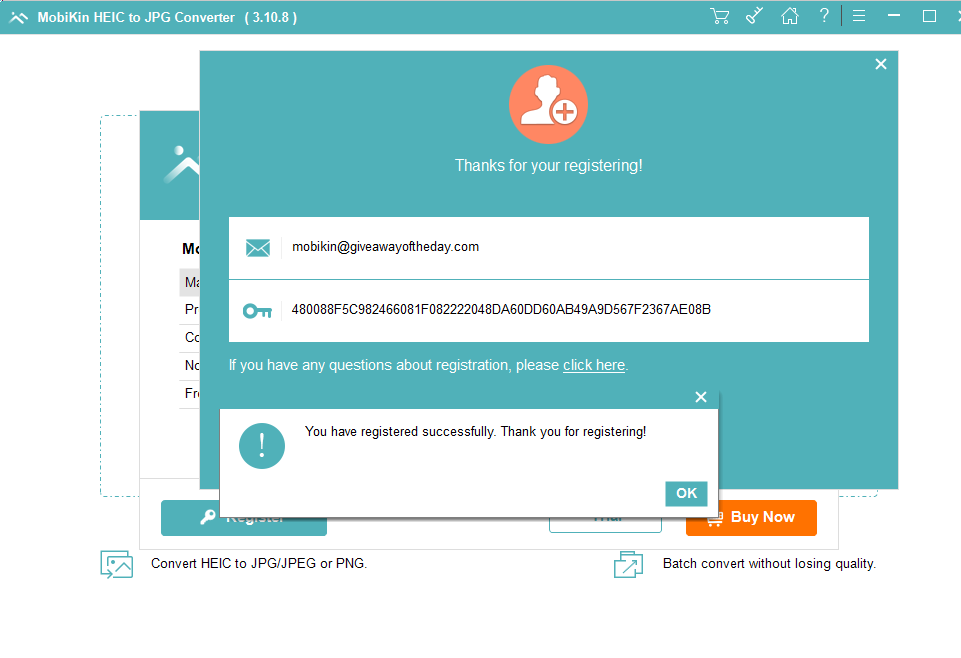
Step 3: Launch the software. You will likely see a registration window or an “Register” button (usually found in the menu or a key icon).
Step 4: Enter the giveaway details exactly as provided below:
- Licensed Email:
[email protected] - License Code:
480088F5C982466081F082222048DA60DD60AB49A9D567F2367AE08B
(Note: Please copy and paste the code to avoid typing errors. Internet connection may be required to verify the license.)
Once registered, you will have full access to all features for one full year!
How to Use MobiKin HEIC to JPG Converter
If you are wondering how to change heic to jpg using this tool, it is incredibly simple. Here is a quick guide:
- Add Files: Open the software and click the “Add HEIC Files” button. You can drag and drop your photos directly into the interface.
- Preview: You will see a list of your photos. You can preview them to ensure you are converting the right files.
- Adjust Output Settings (Optional): By default, the output format is set to JPG. You can adjust the quality slider if you wish (though “Keep Original Quality” is recommended).
- Convert: Click the big “Convert” button. Choose a folder to save your new JPG files, and let the software do the work.
Within seconds, your incompatible HEIC photos will be transformed into universal JPG images ready for editing or sharing.
Why Choose this Giveaway?
There are many online converters, but they often come with risks:
- Privacy Issues: Uploading personal photos to a website is risky.
- Limits: Online tools usually limit the number of photos or file size.
- Internet Dependency: You need a connection to use them.
With this MobiKin HEIC to JPG Converter desktop version, you can convert heic to jpg offline, safely, and without any limits on file numbers. This giveaway is 100% legal and safe to use.
Conclusion
Don’t let file format incompatibility stop you from viewing your precious memories. If you need how to convert heic to jpg solutions that are fast, safe, and free, this giveaway is your best option.
Grab your copy of MobiKin HEIC to JPG Converter 3.10.18 now using the license details above. Remember, this is a limited-time offer, so activate your copy today!
Editor’s Note: This giveaway is sponsored for our readers. If you face any issues with the license code, please let us know in the comments section below.